Part 2. The Stack Audit: A Quick 2-Day Exercise That Might Save Your Town $20,000.
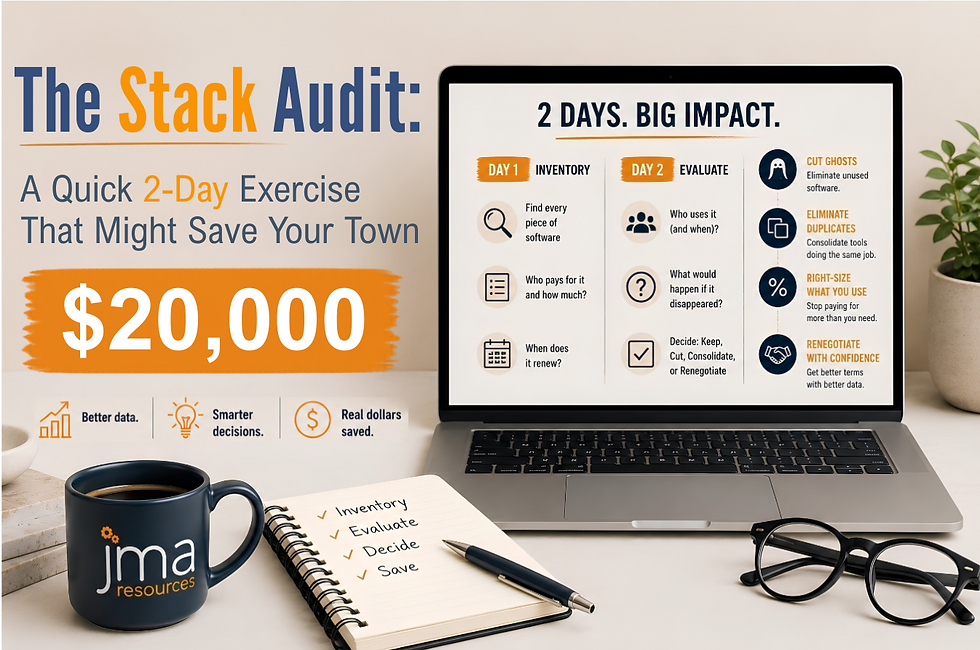
If you did the homework from Part 1, you have a list. Maybe it’s on a legal pad. Maybe it’s a spreadsheet you started on Sunday afternoon and gave up on around line fourteen. Maybe it’s still living in your head, where it has been for about three years now, generating a low background hum of unease every time the finance director sends out the budget call.
Wherever it lives, this post is going to turn it into something useful.
A stack audit is exactly what it sounds like: a structured walkthrough of every piece of software your government pays for, what it actually does, who actually uses it, and what you would actually lose if it disappeared tomorrow. It is the single highest-ROI exercise a small local government can do, and it takes two days. Not a metaphorical “couple of days”. An actual Monday and an actual Tuesday, with a pot of coffee and the patience to open a lot of dusty contract PDFs.
And before you protest that this is the IT director’s job, or the finance director’s job, or the city manager’s job: yes. It is. It’s also the job that, in most small governments, no single person owns end-to-end. Which is exactly why nobody has done it.
Monday Morning: The Inventory
Open a spreadsheet. Five columns to start: Software Name, Annual Cost, Department(s) Paying, Renewal Date, Contract Term. That’s it. Resist the temptation to add fourteen more columns; you’ll lose the whole day.
Now pull the source documents. You will need: last year’s general ledger filtered to anything that smells like software, IT services, or subscriptions; the credit card statements for every department head (yes, those too); your cloud accounting export; and any contract folder, physical or digital, that anyone can find. The credit card statements are non-negotiable. About a third of small-government software spending hides on P-cards under line items like “online services” and “monthly subscription,” which is how you end up with three separate Canva accounts and nobody who can tell you why.
Go line by line. Each charge becomes a row. When you find duplicates, and you will, don’t merge them yet. Two Zoom accounts paid by two departments are a finding, not a data-cleanup task.
By lunch, you should have somewhere between thirty and eighty rows. If you have fewer than thirty, you missed a department. If you have more than eighty and you serve a town under 15,000, you have already found the story. Hint: Don't forget departments with specialized operational needs. Police, public works, and utilities often maintain software purchases that never appear on anyone else's radar.
Monday Afternoon: The Use Test
Add three more columns: Primary User(s), Last Meaningful Use, and Replaceable By Something You Already Own (Y/N/Maybe).
This is the part where you walk down the hall. Or send a very short email. For each tool on the list, you need to find the one person who actually uses it and ask them two questions: when did you last open this, and what would you do if it went away on Monday? Don’t ask whether they like it. People will defend tools they hate out of pure inertia. Ask what they’d do without it.
You are looking for four categories of finding, and you will find all four:
The ghost license. Software that nobody has opened in over a year. Sometimes, nobody has ever opened it. The person who championed the purchase has retired. Everyone has been quietly working around it. You pay somewhere between $400 and $14,000 a year for it.
The duplicate. Two tools, sometimes three, that do the same job for different departments because each one is bought independently. The classic stack: a standalone e-signature tool, a standalone form-builder, and a standalone PDF editor, all running alongside a Microsoft 365 or Google Workspace license that includes versions of all three.
The 4-percenter. A platform you bought for one feature and use for one feature, while paying for the full enterprise tier. The classic case: a $9,000-a-year permitting suite being used as a glorified intake form because nobody had time to configure the workflow engine, the GIS integration, or the resident portal.
The orphan. A tool with exactly one power user, who is leaving in six months, and no documentation. This is not a budget finding. This is a continuity finding, and it is more urgent than the others. Flag it now.
Tuesday: The Value Column
This is where the audit starts paying for itself. Add one more column, just one, and call it Decision. Four allowable values: Keep, Cut, Consolidate, Renegotiate.
Cut is the easiest category. Ghost licenses belong here, along with any tool whose disappearance would generate little more than a shrug. Be ruthless; you can always buy something back, and the act of canceling something is its own forcing function for finding out whether it actually mattered.
Consolidate is where the duplicates go. If you have two form builders, you don’t need two form builders. Pick the cheaper one, or the one already bundled into a license you’re paying for anyway and put the other on the chopping block. Pencil in the savings. They add up faster than you’d guess.
Renegotiate is for the tools you actually use but suspect you’re overpaying for. The signal is usually a per-seat count that hasn’t been updated since 2022, a tier that was sized for a use case you abandoned, or a contract that auto-renewed at a price 18% above what the vendor is currently quoting new customers. (Yes, you can ask. Yes, they will tell you. Yes, this is awkward, and yes, you should do it anyway.)
Keep is the smallest column. It should be the smallest column. If everything ends up in Keep, you didn’t do the audit; you did a tour.
Where does the $20,000 come from?
The number in the title isn’t a marketing flourish. In the small governments between 4,000 and 30,000 residents, the typical first-pass audit surfaces:
Two to four ghost licenses, usually totaling somewhere between $3,000 and $12,000 a year.
One major duplicate is usually $2,000 to $8,000.
One renegotiation that, with a single phone call and a credible willingness to leave, knocks 10 to 25 percent off a flagship contract, and the flagship contract is almost always the biggest line on the list.
Add it up, and $20,000 is a conservative midpoint, not an aspirational ceiling. I have seen audits surface six figures. The town that found $112,000 had been told for years that their software spending was “about average for a community of our size.” It was. That was the problem.
None of this requires you to buy anything. None of it requires a new platform, a consultant engagement, or a six-month implementation. It requires two days, a spreadsheet, and the willingness to ask uncomfortable questions about line items everyone has been politely ignoring.
What to do with the audit when you’re done
Don’t file it. The temptation, after a day or two of this, is to feel virtuous and put the spreadsheet into a folder called ‘Reference’. Don’t.
Walk it into the city manager’s office on Monday. Walk a one-page summary into the next council packet. The audit is at its most powerful in the two weeks immediately after you finish it, while the findings are fresh and the cuts haven’t been re-rationalized. After about a month, the same political gravity that allowed the bloat in the first place will start pulling things back toward the status quo.
Move while the spreadsheet is still warm.
And keep the spreadsheet. Update it every quarter. The single biggest predictor of whether a small government keeps its software costs under control is not the size of its IT budget or the sophistication of its procurement process. It’s whether somebody, anybody, looks at the full list more than once a year.
Your homework before the next post
Block the Two Days. Actually, block it on the calendar, with a name like “Stack Audit” that other people can see, so it doesn’t quietly migrate into yard work. If a full two days feels like too much, do just Monday morning and stop at the inventory. Even the inventory alone, with no decisions attached, will tell you things about your operation that nobody currently knows.
Bring the audit, or even just the inventory, to Post 3. We’re going to look at one specific category of duplicate: the automation features you’re already paying for inside Microsoft 365 and Google Workspace, and the third-party tools you can almost certainly cancel because of them.
See you in Part 3.
Next up: The Software You’re Already Paying For: Automation Hiding Inside Microsoft 365 and Google Workspace.
About the Author: Layne Thompson is Senior Vice President at JMA Resources, Inc., where he leads Growth, Innovation, Research, and Development initiatives. With more than 30 years of experience spanning military service, federal leadership, private industry, and local government, he is passionate about helping communities implement practical, cost-effective technology solutions that deliver real results.
Layne previously served as Borough Manager for the Borough of Mechanicsburg, Pennsylvania, from December 2022 through December 2025.

